
Selling out is the good problem, and most organisers waste it. The people who arrive after the last ticket has gone are the warmest audience you will ever have: they wanted in, they were too late, and they will forgive you almost anything if you get them a seat. A waitlist turns that moment into a queue you control, and on tickts it can hand freed seats to the front of the queue without you doing a thing. This guide covers how it works, when to automate it, and how to use the same list before you have even gone on sale.
What happens when a date sells out
The buy panel is replaced by a sold-out panel with two ways to be first in line. The waitlist is the simple one: a logged-in fan joins with one click, anyone else enters an email address, with a name if they like, and they are emailed if a ticket frees up so they can buy it themselves. A fan cannot join the same date twice, and the list is per date, so a Saturday queue is not offered a Friday seat. Every entry shows in the Waitlist tab with its email, event, position and time joined, filterable by event and exportable as a CSV.
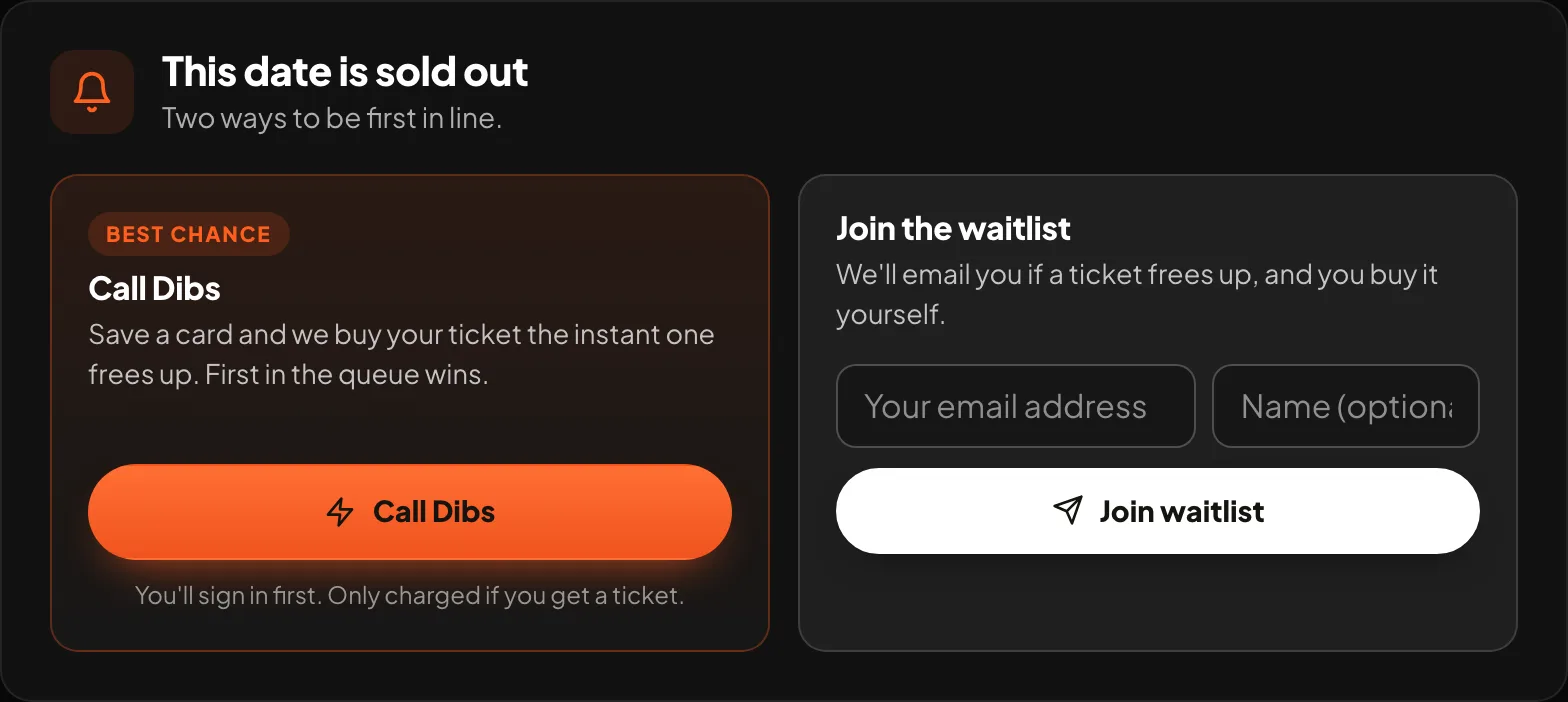
Call Dibs: the queue that buys for them
The second option removes the race. Under Call Dibs, a fan chooses how many tickets they want, optionally sets a maximum price per ticket, and saves a card. Saving the card charges nothing. When inventory frees up, through a refund, a released hold or a resale listing, the fan at the front of the queue is charged and issued their ticket on the spot and emailed straight away. Dibs are strictly first come, first served per ticket type, the quantity is capped at the per-order limit you set on that type, and a fan is only ever charged for tickets they actually get. If only some of what they wanted frees up, they get those and keep their place for the rest. They can cancel from their account at any time.
Two ways to give a seat back
By hand
When a ticket is refunded or capacity goes up, press Notify next to the person at the top of the queue. They get an email with a private buy link and a window, 30 minutes by default, to take it. If they do not, the offer rolls to the next person.
Automatically
Switch Auto-release on for the event and tickts handles the whole thing. The moment a seat frees up on a sold-out date, because you voided a ticket or refunded one, it is held back from public sale and offered to the longest-waiting person through a link only they can use. If they do not take it inside the window, it rolls on down the list, and only when the whole list has passed does it go back on general sale. Set the window anywhere from 5 minutes to 24 hours. The fans who waited get first refusal, not whoever happened to be refreshing the page.
On an auto-release event, voiding a ticket hands its seat to the waitlist. The void confirmation reminds you of that before it goes ahead, so a comp you cancel by mistake does not quietly go to a stranger.
Using the list before you go on sale
The same waitlist works in reverse. Set an on-sale date and tick Tickets dropping soon, and your event page becomes a teaser: poster, date, venue, a countdown, and a Notify me box. Everyone who enters an email joins the waitlist and is emailed automatically the moment tickets go on sale, so your first hour's sales come from the people who were watching, and your first hour is when momentum is made. See and export the list from the Waitlist tab at any time.
A sold-out run, worked through
- Friday sells out on Tuesday. Forty people join the waitlist over the week.
- On Thursday, two buyers ask to cancel. You refund them from their orders. Auto-release is on with a 45-minute window.
- Both seats are offered to the first two on the list at once. One buys in ten minutes; the other link expires and the seat rolls to number three, who buys.
- At the door, 200 seats, 200 scans. The two people who had to drop out were refunded, the two who got in never knew how close they came, and you spent nothing on any of it.
What it costs and where it lives
Waitlists, auto-release and the dropping-soon teaser are Growth-plan features, £29 a month or £290 a year. Free events can use them too; a place on a free date is offered and claimed the same way, just without a payment step. Everything is under Waitlist in the dashboard, and the per-event switches are on the event editor.
