Whether you are putting on your first village hall quiz or your fiftieth sold-out gig, ticketing decides more than how people pay. It sets what your audience is charged, how quickly you get your money, what happens at the door, what you owe people if the night falls through, and what you know about your buyers afterwards. This guide walks through each of those decisions for a UK organiser in 2026, with the real numbers where numbers matter.
The three kinds of ticketing platform
Marketplaces
A marketplace lists your event next to thousands of others and sells you discovery: people browsing the site might find you. In exchange, your event wears the marketplace's branding, competes for attention with everything else on the page, and its buyers pay booking fees that fund the marketplace's marketing. If your audience already finds you through your own channels, you are paying for a shop window you do not need.
Self-service platforms
A self-service platform gives you the event page, the checkout, the tickets and the door tools, and leaves promotion to you. The page carries your name and your artwork, and the link goes wherever your audience already is. This is the model most clubs, promoters, societies and community organisers actually use, because the audience is theirs to begin with.
White-label
White-label ticketing is self-service with the platform's name removed: your own subdomain, your colours and fonts, your branding on tickets and emails. On tickts it is a Pro-plan feature, so a society can start free and move to its own branded storefront when it is worth £69 a month to them.
Fees, and what they are actually for
Every ticket price can carry up to four kinds of charge. Only one of them is a real cost.
| Charge | Who gets it | What it is |
|---|---|---|
| Booking fee | The platform | Margin, charged per ticket, usually a percentage plus pence |
| Commission | The platform | A cut of the face value taken from the organiser |
| Service or delivery charge | The platform | Margin under another name; an e-ticket costs nothing to deliver |
| Payment processing | The card processor | A real cost of taking a card, the same one a corner shop pays |
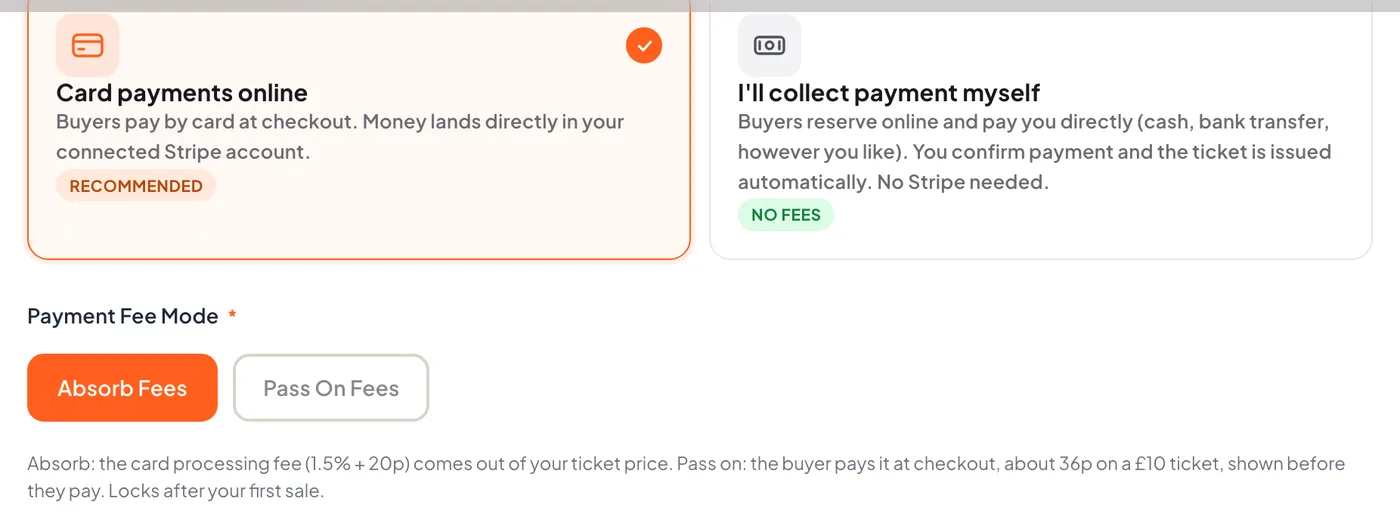
On tickts there is no booking fee and no commission. The only cost of a paid ticket is the card processing: 1.5% plus 20p per transaction on a UK card through Stripe, or 2.9% plus 30p if you take payment through PayPal. You choose whether to absorb that or pass it on, and a passed-on fee is shown to the buyer before they pay.
Working it through on a £30 ticket
| Line | A 12% booking fee plus £1.50 delivery | tickts, fee absorbed | tickts, fee passed on |
|---|---|---|---|
| Face value | £30.00 | £30.00 | £30.00 |
| Added at checkout | £5.10 | £0.00 | £0.65 |
| Buyer pays | £35.10 | £30.00 | £30.66 |
| Organiser receives | £30.00 or less | £29.35 | £30.00 |
The first column uses a common shape for a fee-charging platform rather than any one company's rate card. The 65p is 1.5% of £30, which is 45p, plus 20p. Passed on it becomes 66p, because the 1.5% is taken of the £30.66 the buyer actually pays.
Two more ways to bring the processing cost down. Pay by Bank lets a buyer pay straight from their bank account through Stripe at roughly a third of the card cost, with no chargebacks; you switch it on in your own Stripe account and it appears beside card at checkout. And reserve-and-pay takes no card at all: buyers reserve online, pay you directly by transfer or cash, and the ticket is issued when you mark the order paid.
Starter is free and sells paid tickets with no monthly charge. Growth is £29 a month, or £290 a year, and adds payment plans, waitlists, group discounts, full analytics, memberships and the rep programme. Pro is £69 a month, or £690 a year, and adds white-label, removes tickts branding and gives unlimited door staff. None of the plans adds a booking fee.
QR codes, phones and the door
How a QR ticket works
Every ticket carries its own QR code. At the door a phone scans it, checks it against the live order in under a second, and shows green for valid, red for invalid and amber for already scanned, with a sound for each so the steward does not need to look at the screen. The code is voided the moment it is admitted, so a screenshot passed to a friend scans amber.
Setting up scanning
On tickts there is nothing to buy. Your own login opens the scanner on any phone, the tickts Scanner app is on the App Store, and you invite door staff from the Team page by email; each gets a link that opens the scanner without a password. Starter includes two door-staff seats, Growth five, Pro unlimited. The scanner has three modes: entry, exit for venues that track re-entry, and verify for a spot check at a staircase that does not spend the ticket.
Two things learned at real festivals are worth knowing before the day. First, open the scanner while you still have signal and wait for the offline-ready badge; it then caches every ticket for today and tomorrow and keeps scanning, and refusing repeats, with no connection at all. Second, if two phones both run offline they cannot see each other's scans until they sync, so the same ticket can go green on both; the duplicate shows in the scan log afterwards. Keep one phone online where you can.
Day tickets at multi-day events
A dated day ticket admits on its own day and through the night until 6am, so a Friday ticket cannot walk in on Saturday, while a genuine 1am arrival still gets in. Weekend passes admit once per day.
Phone wallets
Every paid ticket arrives three ways: a PDF attached to the confirmation email, an Add to Apple Wallet button and an Add to Google Wallet button on the ticket page. The wallet pass carries the same QR as the PDF. If you change the venue, the time or the date after people have added the pass, the pass on their phone updates within a few minutes and they get a lock-screen notification, because the change is pushed rather than waiting for them to open it.
Payments: where the money goes and when
Stripe
tickts uses Stripe Connect. When someone buys, the money goes into your own Stripe balance, not into a platform account that pays you later. tickts never holds your money. Payouts to your bank run on Stripe's schedule for your account; a new UK account typically starts on a seven-day rolling delay while Stripe gets to know you, and that shortens. Connecting takes about five minutes: business details, an ID check and a bank account.
PayPal
You can take payment through PayPal instead of, or as well as, Stripe. Buyers see a PayPal button at checkout and the money settles into your PayPal account. A few features run on Stripe only, among them gift cards, payment plans and memberships.
Platform-held funds
Some platforms hold ticket money until after the event and pay out in a lump. That protects the platform against a cancelled event; it also means you fund the deposit, the printing and the artist from your own pocket until then. Ask any platform the plain question: when does the money reach my account?
Guest checkout
Buyers should never have to create an account to buy a ticket. On tickts a logged-out buyer enters their email and name, confirms a six-digit code from their inbox, and pays. A verified account is created quietly behind the order so they can find their tickets later, and a marketing opt-in is a separate, unticked box.
GDPR for organisers
Selling a ticket makes you a data controller for the buyer's details, and your platform a processor working under your instructions. The practical obligations are short.
- Collect only what the order needs. A name and an email address sell a ticket. If you ask checkout questions, ask because you will use the answer.
- Marketing is opt-in, not assumed. Buying a ticket is not consent to a newsletter. On tickts the opt-in is a separate tick box at checkout, unticked by default, and only those who tick it join your list.
- Know who else touches the data. Your platform and its payment processor are your sub-processors. tickts publishes its list and offers a data processing agreement.
- Be able to answer a request. A buyer can ask what you hold and ask you to delete it. Your platform should let you export or remove a buyer's data without a support ticket.
- Special cases carry extra fields. A Gift Aid declaration needs the donor's home address because HMRC requires it; that is the one place tickts asks for an address at checkout.
Accessibility
Accessibility runs in two directions: the ticket-buying page, and the information a disabled fan needs before deciding to come. A ticketing page should be usable with a keyboard and a screen reader, at any zoom, on a phone. On the event itself, say plainly whether the venue is step-free and what the access arrangements are; on tickts you mark an event wheelchair accessible, write access notes that appear on the page, and can offer companion tickets so a fan who needs a carer is not charged twice. The Equality Act 2010 asks organisers for reasonable adjustments, and the cheapest adjustment is a clear paragraph and a named contact.
Refunds and consumer rights
What the law says
Two rules cover almost every case. The Consumer Contracts Regulations 2013 give online buyers a 14-day right to cancel most purchases, but exempt leisure services for a specific date, which is why event tickets are sold without a cooling-off period. And if the event is cancelled, the buyer is entitled to the face value back, whatever the refund policy says, because they did not get what they paid for. Postponements are the grey area: many organisers offer a refund window at the new date, and it is good practice to say so up front.
Setting your policy
Set the policy per event and show it at checkout, so there is a record of what each buyer agreed to. On tickts the choices are no refunds, refunds up to the event, refunds up to a cut-off some days before, or your own wording, and the chosen policy is captured against every order. A no-refunds policy does not stop you refunding at your discretion; it stops anyone claiming one as of right.
How refunds actually happen
From the order, a full refund voids the tickets, restores the capacity and emails the buyer, with the money back through Stripe in five to ten working days. A partial refund leaves the tickets valid. One thing to know before you need it: a refund comes out of your Stripe balance, so if your takings have already paid out to your bank, top the balance up or wait for new sales and run it again. tickts also offers buyers optional refund protection at checkout, at no cost to you; if a protected buyer cannot make it, the protection provider refunds them and you keep the sale.
Which set-up fits your event
| Event | What matters | How tickts handles it |
|---|---|---|
| Single night, general admission | Simple ticket types, a quick checkout, a scanner | Up to four pricing tiers per type that switch by quantity or date, min and max per order, hidden types unlocked by code |
| Multi-date runs and sports seasons | Many dates, one page, season tickets | Every date on one page with its own price, season passes that scan once per fixture, cup ties in or out of the pass, home and away allocations |
| Festivals and all-day events | Selling on the day, day tickets versus passes, walk-ups | A custom sales-close time per date so online sales run all day, day-ticket windows, weekend passes, box office at the gate |
| Seated shows | A seat picker that does not sell the same seat twice | Seating layouts per date with an interactive picker and Best Available |
| Private and corporate | Not listed publicly, invite only | Link only mode: live for anyone with the link, absent from listings and search |
| Free events | Numbers and a guest list, no card | Free tickets need no Stripe account; fans still get a QR to scan |
What you learn from selling online
Paper tickets tell you how many you sold. Online tickets tell you when, from where and after what. Even the free Starter plan shows your sales as they come in. Growth's analytics add the pieces that change decisions: a conversion funnel from page views to checkouts to orders, so you can see whether the problem is traffic or the page; sales benchmarks against an anonymous cohort of similar UK events, so you know whether being half sold at 30 days out is on track; and audience geography at town level, so the posters go where the buyers live. None of it exposes an individual buyer, and none of your numbers are shown to anyone else.
Getting started
- Create a free organiser account. Nothing to pay and no card needed.
- Build the event. Dates, venue, ticket types and artwork can all be saved as a draft before you connect anything.
- Connect Stripe or PayPal, about five minutes with your bank details. Paid events cannot go on sale until one is connected; free events go live without it.
- Publish, share the link, and open the scanner on your phone on the night.
If it is easier to see than to read about, send us the details of your next event and we will build the page for you to look at before you decide anything.